.png)
.png)
.png)

How do you Recycle Old Computers?

Updated: May 12
Got an old computer gathering dust in your Atlanta home or office? Or have you upgraded to a new model and are wondering how to recycle old computers safely?
Many people still throw outdated computers, laptops, and IT assets away without realizing the risks. Old electronics can contain sensitive data, batteries, circuit boards, and materials that should not end up in landfill. If they are handled carelessly, they can create data security issues and environmental harm over time.
That is why recycling old computers is about more than just getting rid of unwanted equipment. It is about protecting your information, recovering useful materials, and making sure electronic waste is handled responsibly.
At Atlanta Ewaste Solutions, we help individuals and businesses recycle old computers, old laptops, and other electronics safely and efficiently in Atlanta. In this guide, we will explain how to recycle computers properly, what steps to take before recycling, where to recycle old computer equipment, and what happens once your device reaches the recycling facility.
What is the right way to dispose of an old computer?
The right way to dispose of an old computer is to prepare it properly, protect your data, and hand it over to a trusted electronics recycler.
Many people ask questions differently, but
The answer is simple. You should never place old computers, laptops, hard drives, or related electronics in the regular trash. Instead, you should recycle them through a company that understands data destruction, material recovery, and responsible e-waste handling.
Recycling old computers helps reduce landfill waste, supports the recovery of metals and reusable components, and reduces the need for new raw materials. In some cases, working devices may even be resold, refurbished, donated, or assigned a resale value depending on their condition.
Initial steps to recycle old computers
Before you recycle your old device, take a few important steps to protect your files and make the process easier.
Back up your data
If your computer or laptop still contains important files, photos, work documents, or personal records, back them up first.
You can move data to:
an external hard drive
cloud storage such as Google Drive or Dropbox
another desktop or laptop
built-in backup tools such as Windows Backup or macOS Time Machine
This makes sure your files stay accessible after the device is recycled.
Wipe your personal information
Once your files are backed up, the next step is data security.
Simply deleting folders is not enough. If you are wondering how to recycle old computers safely, this is one of the most important parts of the process. You should:
sign out of email, banking, and social media accounts
remove saved passwords
deauthorize the device from any linked accounts
uninstall sensitive applications if needed
clear browser history
reset the computer if appropriate
arrange secure data destruction for sensitive or business information
If the device contains confidential information, financial records, customer data, or company files, professional data destruction is the safer option. Ask whether the recycler can provide secure media handling and a computer recycling certificate of destruction or related documentation for peace of mind.
Remove accessories and separate additional items
Before recycling old computer equipment, separate the main unit from other accessories if needed. These may include:
monitors
keyboards
mice
docking stations
chargers
cables
printers
external hard drives
In many cases, these items can be recycled too, but it is still useful to sort them so the recycler can process them properly.
Is your old computer ready for recycling?
Before handing over the device, check its condition.
A computer may be suitable for:
reuse
resale
donation
parts recovery
full recycling
Look for cracked screens, battery swelling, missing parts, severe damage, or signs that the device no longer works. If you are recycling old PCs in bulk, it also helps to tell the recycler whether the devices are working, locked, damaged, or incomplete.
This is especially useful for computer motherboard recycling, parts recovery, and valuation of reusable equipment.
Choose a certified computer recycler
If you want to know how to recycle computers the right way, choosing the recycler matters.
Look for a company that can clearly explain:
how your data is handled
whether devices are reused, resold, dismantled, or destroyed
whether they issue documentation after recycling
whether they offer pickup for bulk loads
how they manage downstream recycling partners
whether they follow responsible e-waste handling practices
For businesses, schools, medical offices, warehouses, and corporate sites, this is even more important. Ask whether the recycler offers inventory tracking, chain-of-custody handling, on-site destruction options, or documentation aligned with your internal disposal process.
When comparing providers, it is also worth asking whether they follow recognized industry practices for media sanitization and electronics recycling. Many businesses look for terms such as secure data destruction, certificate of destruction, zero landfill approach, IT asset disposition, and responsible downstream processing when choosing a recycler.
At Atlanta eWaste Solutions, we offer certified, transparent, and free computer recycling with a focus on secure handling and environmental responsibility.
Safely deliver your computer for recycling
Once your computer is ready, the next question is how to get it to the recycler safely.
At Atlanta eWaste Solutions, you can:
drop off your old computer at our facility
request a pickup for larger quantities
arrange collection if you need to recycle business computers in bulk
If you are a homeowner, small business, office manager, school, or company with multiple devices, pickup can save time and reduce handling risk.
For bulk loads, it is always a good idea to request a recycling receipt and ask whether a certificate of destruction is available for your records.
How to recycle business computers
Recycling one home laptop is one thing. Recycling office equipment is another.
If you need to recycle business computers, the process should be more structured. Business devices often contain:
customer information
employee records
financial files
saved credentials
company emails
internal documents
That is why businesses should work with a recycler that understands secure handling from collection to final processing.
A proper business computer recycling process may include:
scheduled pickup
secure transport
device counting or inventory support
data destruction options
on-site shredding if requested
recycling documentation
possible resale value recovery for qualified IT assets
Whether you are replacing desktops, clearing out old laptops, removing retired servers, or decommissioning office equipment, the goal is the same: protect data, free up space, and dispose of electronics responsibly.

What happens to your recycled computer?
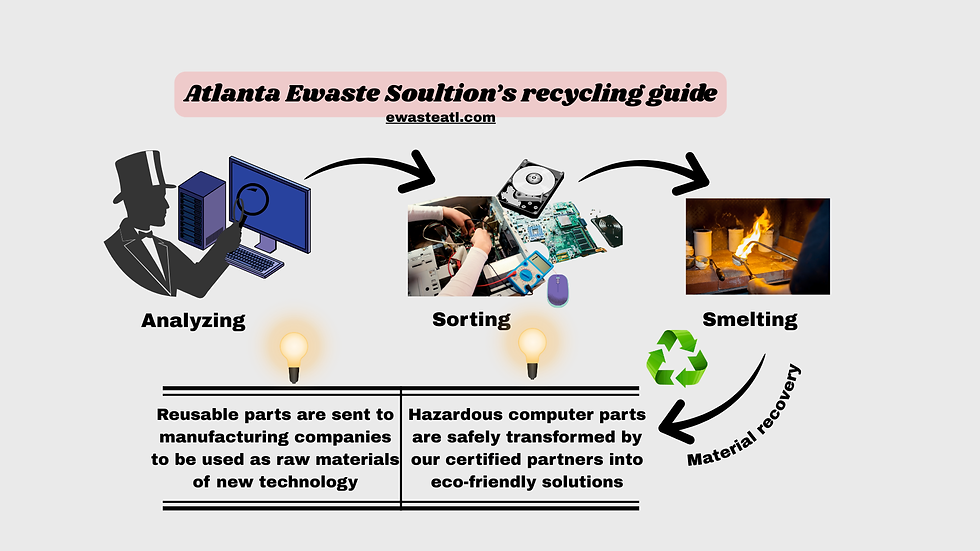
After your computer reaches the recycling facility, it usually goes through several stages.
1. Inspection and assessment
The first step is evaluation. Our team checks the condition of the device to see whether it can be reused, refurbished, resold, or dismantled for recycling.
2. Data handling and storage device removal
If needed, storage devices are handled for secure destruction or prepared according to the agreed disposal process. This step is especially important for businesses and any device containing sensitive information.
3. Sorting and dismantling
Computers contain a mix of materials and components. These may include:
metals
plastics
glass
circuit boards
batteries
power supplies
wires
hard drives
SSDs
motherboards
The device is dismantled so these parts can be processed correctly.
4. Material recovery
Once sorted, reusable materials are sent into appropriate recovery streams. Metals, plastics, and certain components can often be processed for reuse in manufacturing and other industrial applications. This helps reduce waste and supports a more sustainable recycling system.
5. Reuse where possible
Some devices or components may still hold value. If they meet the right condition standards, they may be refurbished, remarketed, or reused instead of being destroyed.
Can you recycle old PCs, laptops, Dell computers, and motherboards?
Yes. Most reputable electronics recyclers accept a wide range of computer equipment.
This can include:
desktop computers
old PCs
laptop computers
business laptops
hard drives
SSDs
servers
workstations
printers
monitors
motherboards
cables and accessories
If you are specifically searching for Dell computer recycling, it is worth checking whether your recycler accepts branded devices and related accessories such as chargers, docks, and monitors.
If you are looking for computer motherboard recycling, that is usually part of the dismantling and parts recovery process. Motherboards, circuit boards, and internal electronics are separated and sent through the correct downstream recycling channels.
What Atlanta eWaste Solutions offers for seamless recycling
Recycling electronics in Atlanta should not be complicated. Atlanta eWaste Solutions offers services designed to make the process easier for both individuals and businesses.
Our services include:
secure data destruction
on-site data destruction and shredding if requested
free pickup service for qualifying loads
certifications after recycling
potential value recovery for used IT assets
support for greener asset management practices
Whether you need to recycle my laptop, clear out old office PCs, or dispose of outdated business equipment, we help make the process more straightforward.
Where do you recycle old computers and laptops?
Many people search:
where do you recycle old computers
where can you recycle old laptops
where to recycle old computer equipment
free computer recycling near me
The best place to recycle computers is a trusted electronics recycler that accepts the equipment you have, explains its process clearly, and offers the level of service you need.
If there is no recycling center close to your location, online recycling directories can help.
Earth911 recycling center
Earth911 helps users find local recycling options by entering a ZIP code and the type of item to be recycled.
Greener Gadgets recycling center
Greener Gadgets also helps users locate electronics recycling options and can be useful when researching where to recycle old laptops, computers, and related devices.
If you are a business, it is worth asking whether the provider offers pickup, data destruction, and documentation rather than just basic drop-off.
Why recycling old computers matters
Old computers should not sit unused forever, and they should not be dumped carelessly.
Recycling old computer equipment helps:
reduce electronic waste
recover reusable materials
support a cleaner local environment
reduce unnecessary landfill disposal
protect sensitive data when handled correctly
give reusable devices a second life where possible
It also supports a more responsible circular economy by keeping electronics in use longer and reducing waste at the end of the device lifecycle.
FAQs
Can I recycle multiple computers at once?
Yes. If you have several computers, desktops, laptops, or related devices, bulk pickup may be available. This is helpful for offices, schools, businesses, and anyone clearing larger volumes of equipment.
How do I recycle a laptop?
If you want to recycle your laptop, first back up your files, sign out of your accounts, remove saved passwords, and wipe sensitive information. Then take it to a trusted electronics recycler or arrange pickup if available.
Where can you recycle old laptops?
You can recycle old laptops through an electronics recycling company, a local drop-off provider, or a recycling locator such as Earth911 or Greener Gadgets. Always check whether the recycler also handles data destruction if needed.
Do you offer free computer recycling?
Free computer recycling may be available depending on the device type, quantity, and service needed. If you have multiple systems or business equipment, ask whether pickup and recycling are included.
What is a computer recycling certificate of destruction?
A certificate of destruction is documentation showing that a device, storage media, or related material has been destroyed or processed according to the agreed recycling or disposal method. Businesses often request this for record-keeping and internal compliance purposes.
Can I recycle business computers with hard drives still inside?
Yes, but you should always confirm how the hard drives will be handled. If the devices contain sensitive information, ask about secure data destruction before collection or processing.
Will I get paid for recycling my old computer?
Possibly. If the equipment still holds resale or parts value, it may qualify for buyback or value recovery. The amount depends on the condition, brand, age, and type of equipment.
What types of computers and printers can I recycle?
Most recyclers accept desktop computers, laptops, old PCs, printers, monitors, servers, hard drives, motherboards, and accessories. It is always best to confirm accepted items in advance.
Contact us:
Call (404) 850-3717
Email recycle@ewasteatl.com


Comments