.png)
.png)
.png)

How Much Is My Old Server/Laptop Worth? A Buyer's Guide to Valuation

As a laptop owner getting rid of your old laptops, you should know the worth of your laptop or server. Whether you are selling them on a higher level with larger quantities or just need to get rid of 1-2 laptops, this complete guide will help you evaluate your old laptops' or server value.
Every old and used laptop has a certain resale value depending upon many factors, such as brand, condition, age, or functionality. The same goes for servers. Both personal laptops and enterprise servers are valued differently by different buyers and by following different criteria. We have discussed every aspect of both in this guide, so at the end of the guide you’ll be able to value your device and sell at a competitive price.

How Much Is My Old Laptop Worth?
As technology is evolving faster than you think and new laptops with better hardware and a more appealing structure are being introduced in the market, it is natural for people to be drawn towards them and sell the old ones. So you should know how much your laptop is worth and how you can get higher rates.
Therefore, let's establish the basic framework of pricing first. The model of your laptop gives you the starting price, while the other factors—age, condition, or specifications—affect its value and typically reduce the final offer. A used laptop typically sells for anywhere between $20 and $1,500. That is a wide range; therefore, we break down every factor below to give you the realistic range that you can apply to your laptops.
Laptop value by age
Depreciation on laptops is front-loaded; that means a laptop loses its value fastest in the first year, and then the curve flattens and reduces slowly. As the budget and premium laptops start at very different original prices, there is a wide difference in their resale values. The table shows clearly where your laptop lands depending on the age.
Laptop Age | % of Original Price Retained | Budget/Consumer Tier (Acer, low-end Asus/HP) | Premium/Business Tier (MacBook, ThinkPad, XPS, EliteBook) |
1 year old | 60–70% | $250 – $400 | $700 – $1,200 |
2 years old | 50–60% | $180 – $300 | $550 – $900 |
3 years old | 35–45% | $130 – $220 | $400 – $650 |
4 years old | 25–35% | $90 – $160 | $280 – $450 |
5 years old | 18–25% | $60 – $110 | $180 – $320 |
6 years old | 12–18% | $40 – $75 | $120 – $220 |
7–8 years old | 5–12% | $25 – $50 | $70 – $140 |
9–10 years old | Minimal | $10 – $30 | $40 – $80 |
10+ years old | Parts value only | $0 – $20 | $10 – $50 |
Also, for accurate pricing, consider the laptop's condition before finalizing. For this purpose, within each tier, add roughly 10-15% for excellent condition and a healthy battery, and subtract 15-25% for visible damage or a degraded battery. Plus, the spinning hardware instead of an SSD also decreases the cost.
Laptop Value by Brand
Brand is one of the biggest value-determination factors, as it indicates the quality of the laptop, repairability chances, and how deep the resale market is for that specific brand. The ranges mentioned below in the table are typically 3-4 years old laptops in good working condition. After determining your brand's value, you can use the above age table for more specific costs.
Brand | Entry-Level Configuration | Higher-specification configuration | What Holds Value Within the Line |
Apple / MacBook | $350 – $500 (Intel-era) | $700–$950 (Apple Silicon M1–M2) | M-series chips hold value far better than any Intel-era MacBook. |
Dell (XPS, Latitude) | $250 – $380 (Inspiron) | $450 – $650 (XPS/Latitude) | XPS and Latitude business lines outperform the consumer Inspiron line |
Lenovo (ThinkPad) | $220 – $350 (base T-series) | $450 – $650 (X1 Carbon/Yoga) | X1 Carbon/Yoga holds the best value of any Windows business line. |
HP (EliteBook, Spectre, Pavilion) | $150 – $250 (Pavilion/Stream) | $350 – $550 (EliteBook/Spectre) | EliteBook and Spectre significantly outperform budget Pavilion/Stream |
Asus (ZenBook, ROG) | $180 – $280 (base ZenBook) | $400 – $600 (ROG, GPU-dependent) | ROG gaming models are priced more by GPU generation than age |
Acer | $90 – $150 | $150 – $220 (higher-RAM models) | Consumer-grade across the board; steady but modest resale |
Microsoft Surface | $250–$380 (Surface Laptop base) | $400 – $600 (Surface Pro/higher tier) | Holds value comparably to premium Windows ultrabooks |
Alienware / gaming laptops | $350 – $500 (RTX 3050/3060) | $600 – $900 (RTX 3070/4060+) | Priced almost entirely on GPU generation rather than age |

What Affects Laptop Value
There are many other factors regarding condition and specifications that affect the resale value of laptops. These are discussed below
RAM and storage type:
In 2026, a minimum of 8 GB RAM and an SSD drive are the baseline for buyers. If you have a laptop with 16 GB+ RAM and an SSD, it will sell for significantly more than the laptop with 4 GB RAM and a spinning hard drive. This is the biggest value driver for older laptops.
Battery health:
A battery that still holds a charge for a couple of hours adds value to your offer, while degraded batteries reduce it because the laptop may need to be plugged in continuously or require replacement. In older models, the replacements are difficult to find, which further reduces the resale value.
Physical condition:
Physical damages such as cracked screens, missing keys, broken hinges, or heavy chassis damage can reduce the value by 40-60%, so before selling, either refurbish it or sell at lower prices.
Original charger and accessories:
If you are missing a charger, then it can directly reduce $20-40 from your offer, and also the original packaging and other accessories can add to the value.
Processor and generation:
Generation also matters in pricing, as the i5 base model sells at lower prices as compared to the i7 or i9. It is the next biggest driver after the model. Plus, on MacBooks, the chip tiers—m-base vs. m-pro vs. m-max—all have increasing prices.
Is It Worth Fixing, Upgrading, or Keeping an Old Laptop?
Before you decide to sell, it's worth asking whether repairing or upgrading makes more financial sense than a resale.
Scenario | Verdict | Why |
HDD → SSD swap | Upgrade | Cheap; adds 30–50% resale value |
Cracked screen/bad battery, <5 yrs, premium brand | Repair | Repair cost < value lost from damage |
Faulty budget laptop, 7+ yrs | Don't repair | Resale won't cover labor cost |
Laptop worth under $75 | Keep, don't sell. | Selling effort outweighs the payout |
Unused laptop in a drawer | Don't keep | Loses value every quarter it sits |
Where to Sell (or Responsibly Recycle) an Old Laptop
There are many options where you can sell your old laptops at reasonable prices. For example,
Online marketplaces such as eBay and Facebook Marketplace, they typically pay more, but it takes 1-3 weeks to sell, and you have to post photos, answer the buyers' questions, and handle shipping yourself. In short, it needs some manual work, but the pay is good.
You can participate in the manufacturer's trade-in program, which is more convenient. If you are buying a replacement from the same brand, you can pay from in-store cash credits and lower the new device's value.
There are also local buyback programs that pay cash on the spot but at a discounted value.
You can hand over the laptop to certified electronic recyclers. This is the best option if your laptop's resale value is minimal or there are irrepairable damages. They ensure that the data is destroyed and devices stay out of the landfill.
How Much Is My Old Server Worth?
Now that the laptop's worth is clear for you, let's discuss servers. Used enterprise servers sell in a different consumer market, and unlike laptops, where the main pricing factor is age and model, servers are scaled by configuration.
What actually drives a server's resale value
These are the important factors that determine how much your server is worth. This list will give you the basic understanding of what you should know about servers to be able to evaluate their price efficiently.
CPU generation and core unit
RAM type and capacity
Chassis condition and completeness
Storage configuration
Warranty and support status
Market demand
Refresh cycle
Even if your server is old, it doesn't mean it has no resale value; if its condition is good, it has a high storage capacity, and is complete without any missing kits or bezels, it can be sold at a good price. But old spinning hard disk drives don't add value to your server, and it is almost considered zero in markets.
Here is the table set by brand and generation that gives you the estimated starting price.
Server Value by Brand and Generation
Model / Line | CPU Generation | Low Config (base RAM, SAS SSD) | High Config (max. RAM, NVMe) |
Dell PowerEdge R750/R760 | Ice Lake/Sapphire Rapids | $2,200 – $3,000 | $3,400 – $4,500 |
Dell PowerEdge R740/R740xd | Cascade Lake | $400 – $800 | $1,200 – $2,400 |
Dell PowerEdge R730/R730xd | Broadwell | $150 – $450 | $600 – $1,000 |
Dell PowerEdge R720/R720xd | Sandy/Ivy Bridge | $100 – $250 | $280 – $450 |
HPE ProLiant DL380 Gen10+ | Cascade/Ice Lake | $600 – $1,300 | $2,200 – $3,800 |
HPE ProLiant DL360 Gen10 | Skylake/Cascade | $450 – $800 | $950 – $1,400 |
HPE ProLiant DL380/360 Gen8/9 | Ivy Bridge–Broadwell | $100 – $300 | $350 – $650 |
Cisco UCS C240/C220 M6/M7 | Ice Lake/Sapphire Rapids | $800 – $1,600 | $2,200 – $3,500 |
Cisco UCS C220/C240 M5 | Cascade/Skylake | $350 – $650 | $750 – $1,300 |
Cisco UCS M3/M4 | Sandy Bridge–Skylake | $100 – $350 | $400 – $700 |
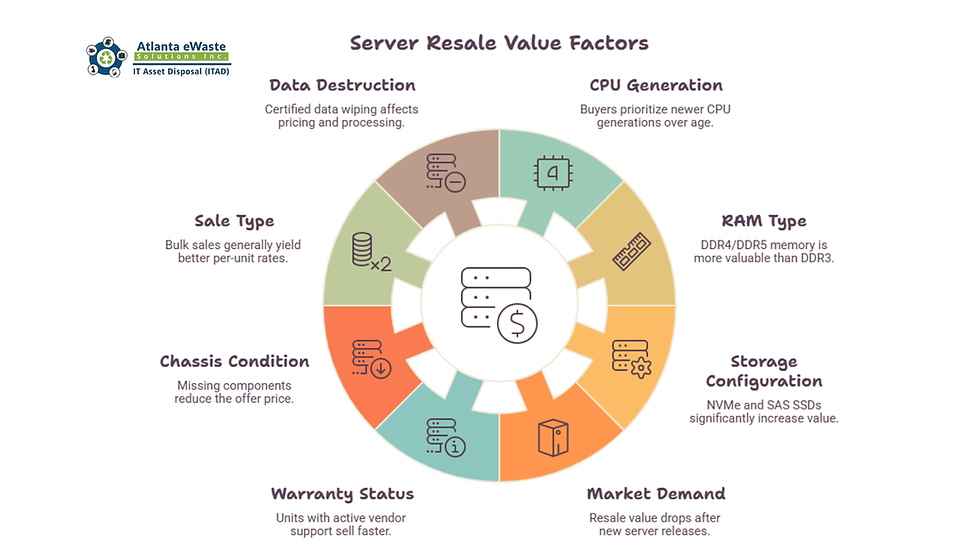
Why two identical servers can get very different offers
There are many factors that influence the market value of servers; for example, the amount of storage installed in your server can have a significant impact on the server's resale value. Also, the processors play a major role in resale marketing, as the two servers from the same generation can have very different values depending on the CPU model that has higher-performance processors, demanding much more pricing than the usual one.
Moreover, consider selling multiple servers together instead of individually because collecting and processing the entire batch is more efficient for buyers than handling servers one by one.
Data destruction before resale or recycling
Always ensure secure data destruction before selling a server. Most of the enterprise servers contain sensitive data, and even the common household servers could have personal information that needs to be carefully wiped out. Most of the ITAD vendors offer certified data destruction to NIST 800-88 standards; never assume that a factory reset is enough for data removal.
Also, if you need a documented chain of custody, look for a vendor that provides a certificate of data destruction along with the buyback and recycling process.
Final tips for selling the old servers
Sell while demanding is still high, as servers generally retain more value before a new hardware generation enters the market.
Provide complete hardware specifications.
Keep the server complete—no missing drives, memory, or other components.
Choose a buyer that includes certified data destruction so that all your sensitive information is destroyed before getting into another hand.
Request quotes from several buyers to ensure you receive the best value.
Include original accessories if available.
Clean and inspect the equipment before developing a quote and offer a well-maintained server with no obvious damage.
Selling or Recycling Locally in Atlanta: Get the Best Prices with Atlanta eWaste Solutions
Whether you are clearing out a single laptop from home or decommissioning a rack of enterprise servers, or working with a local, certified e-waste and data destruction provider, it solves both the valuation and the compliance questions at once. For laptops, personal devices, servers, or business equipment, a local recycler is the best option to avoid shipping costs and logistics.
Atlanta eWaste Solutions handles both ends of this process efficiently for businesses and individuals across Atlanta and North Georgia. We handle full server and data center decommissioning with certified hard drive destruction and documented compliance. We offer
Free valuation/quote
Laptop drop-off
Server and bulk equipment pickup
Certified data wiping or destruction
Buyback consideration


Comments